
A complete payroll year end checklist for accountants and their clients
The payroll year end process is one of those annual rituals that keeps everything running smoothly – a vital checkpoint for accountants and payroll professionals to close off the previous tax year, complete all reports, and prepare clients for a clean start in the new tax year.
Whether you manage a single payroll or more than one PAYE scheme, following a clear payroll year end checklist ensures that every client’s employee payroll records, tax codes, and National Insurance contributions are accurate, compliant, and ready for the next pay period.
Here’s a simple six-step guide to help accountants and payroll specialists complete the payroll year end submission efficiently and confidently — for both your practice and your clients.
1. Check your clients’ final pay period
Start by reviewing each client’s final pay period of the tax year.
For monthly payrolls, run March as usual. For weekly payroll clients, check if a week 53 applies — this happens when there are 53 pay days in a tax year (depending on the pay date). Make sure any final pay run is processed correctly so the right amount of income tax and National Insurance is calculated.
If you pay weekly or fortnightly, double-check the same PAYE scheme reference is used throughout the payroll year to keep data consistent.
A seasoned payroll manager will tell you: this step is all about precision. Errors in one final pay can ripple through to your final payroll report and full payment submission (FPS) later.
2. Process leavers, joiners, and employee details
Before you make your final submission for the year, ensure all employee payroll records are up to date.
- Confirm any leavers have been processed correctly and issued with P45s
- Add new starters who joined before the final day of the tax year
- Update any changes to employee details, including student loan repayments and deferred National Insurance settings
- Check employment allowance eligibility if clients plan to claim employment allowance in the new tax year.
Clean records now mean fewer issues later – and your clients will thank you for a seamless transition between years.
3. Submit your final Full Payment Submission (FPS) and Employer Payment Summary (EPS)
This is where the payroll year end submission becomes official.
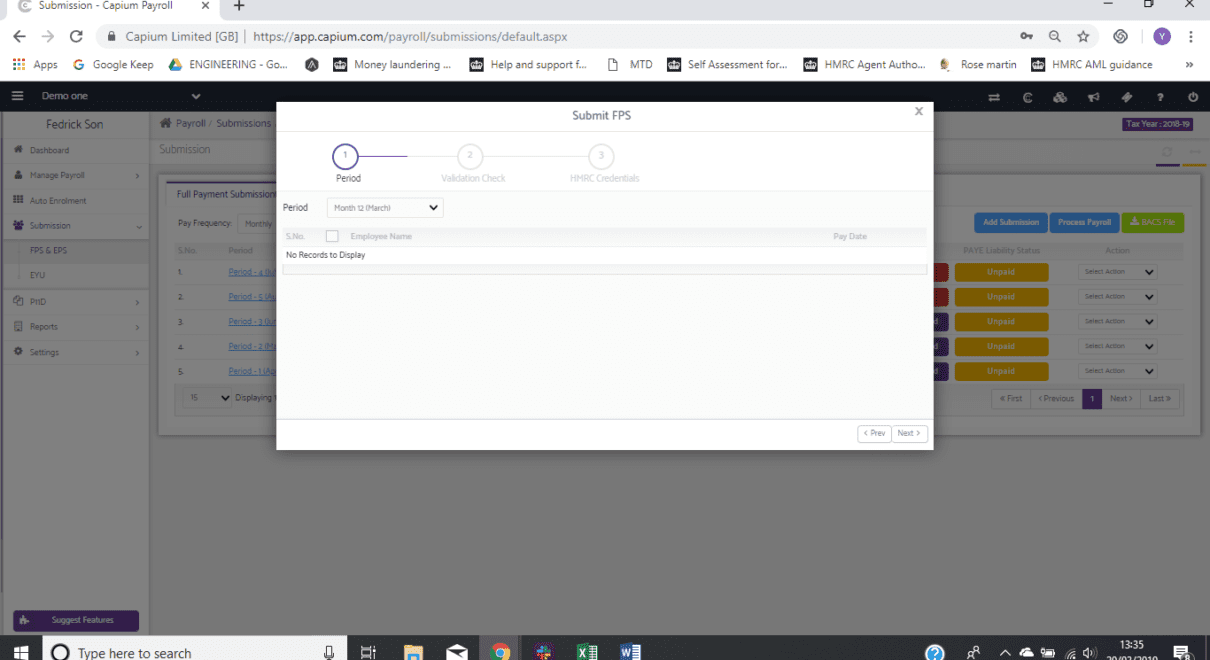
Your final Full Payment Submission (FPS) must be sent on or before the final pay date of the tax year. This confirms total pay, deductions, and National Insurance contributions for each employee. If you need to send a final FPS early, most payroll software (including Capium) allows you to flag this clearly.
After the final FPS, submit your Employer Payment Summary (EPS) – sometimes referred to as the final EPS – to HMRC. This acts as your final report, letting HMRC know that payroll for the year is complete. The Employer Payment Summary EPS also includes information such as statutory payments recovered, employment allowance claims, and other adjustments.
For accountants using Capium payroll software, these steps are fully integrated. The system automatically compiles both FPS and EPS data, reducing admin time and helping you avoid missed payroll year end deadlines.
4. Issue P60s and report benefits
Once your final payroll run is complete, it’s time to provide end of year information to clients and employees.
Each employee who was still on the payroll on 5 April must receive a P60, summarising total pay, income tax, and National Insurance deductions for the year. Capium generates these for you, so you can download or send them securely through the employee portal.
Next, prepare for expenses and benefits reporting. Forms P11D and P11D(b) (sometimes written as P11D b) must be submitted to HMRC by 6 July, covering all taxable expenses and Class 1A National Insurance on benefits provided.
A quick reminder for your payroll benefits process: review taxable expenses, report benefits accurately, and calculate any Class 1A National Insurance due.
5. Create and review your new payroll year
Once the final payroll and submissions are done, it’s time to roll forward.
In Capium, you can create your new payroll year – and the system automatically carries forward key data such as employee details, pay elements, and basic earnings assessment results for workplace pensions. Learn more about the features of payroll software for accountants.
Before processing the first pay period of the new tax year, take a few moments to:
- Update all employee tax codes to the correct tax code for the new year (HMRC will notify you of any tax code changes)
- Check for updated student loan thresholds and statutory payments
- Review National Minimum Wage and National Insurance thresholds
- Ensure employment allowance is re-applied if your clients are eligible
For more context on recent changes in accounting in the UK, review this overview of the top transformations over the past decade.
Most payroll systems will handle these updates automatically, but it’s still good practice for accountants to check the details manually: especially when you manage more than one payroll or multiple tax months.
6. Keep key payroll year end dates in mind
Here are the essential HMRC deadlines every payroll manager should have in their diary:
- 19 April – Submit your final FPS and final EPS for the previous tax year. HMRC won’t accept late payment submissions after this date.
- 31 May – Provide a P60 to each employee on the payroll as of 5 April.
- 6 July – Submit P11D and P11D(b) forms for expenses and benefits, including any Class 1A National Insurance owed.
Keeping these key dates visible ensures every client’s payroll year end is handled accurately and on time.
Simplify your payroll year end process with Capium
Managing multiple clients through year end payroll can be stressful, especially when juggling final submissions, tax code updates, and compliance tasks across different systems. That’s where Capium helps. If you’re interested in selecting the right accounts production software, there are many solutions to consider—Capium offers insights to make your decision easier.
Our cloud-based payroll software is built for accountants and payroll professionals, streamlining every step of the payroll year end process: from final payroll reports and employment payment summaries to new tax code updates and P60 generation.
Capium automates the details, checks calculations, and keeps you fully aligned with HMRC requirements, saving time for you and delivering accuracy for your clients.
So when the final task of the tax year comes around, you can relax knowing every final submission, report, and deadline is taken care of – letting you focus on advising clients and planning for the year ahead.
Discover Capium Payroll and make your payroll year end effortless. Learn more about self assessment software integrations that can streamline your workflow.